
Troubleshooting CocoaPods CDN Source
To integrate the IAPASAP SDK successfully, ensure your .netrc file is configured correctly. A misconfigured file can lead to errors when executing thepod installcommand.
Follow the steps below to troubleshoot any issues.
Step 1: Remove CocoaPods cache
To ensure that the latest CDN source is used, remove the CocoaPods cache from your local disk by following these steps:
- Go to the
~/.cocoapods/repodirectory and remove the folder that is prefixed withi-v1-file-common-. This folder contains the metadata and the .podspec file of CocoaPods. - Run the following command to remove the CocoaPods cache.
pod cache clean IAPASAP --all; Step 2: Update your CocoaPods
CocoaPods version 1.10.0 or later is required. Run the following command to check your current version. Update if below the required version:
pod --versionStep 3: Set up the .netrc file correctly
Ensure that the.netrc file is set up correctly with the following steps:
- Run the command below to verify if the .netrc file exists in your
$HOMEdirectory.
cd ~; ls .netrc- Ensure that the .netrc file contains the correct credentials for our server, as shown in Credentials.
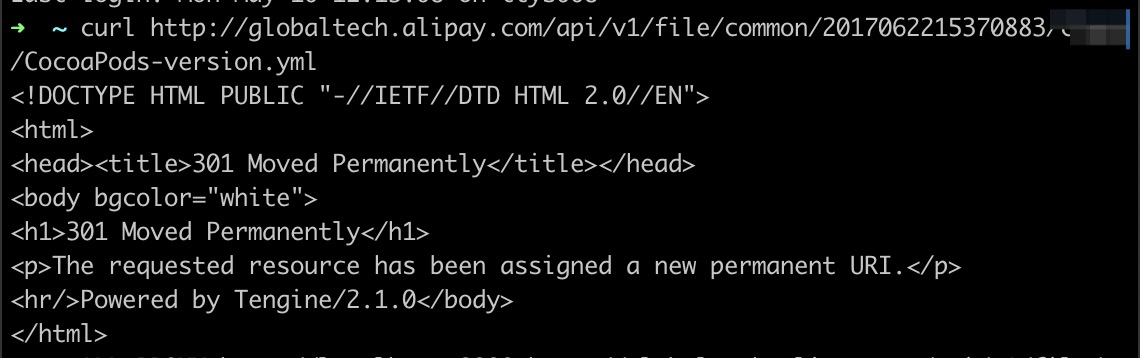
- Run the following command to download the CocoaPods-version.yml file again.
curl --netrc http://globaltech.alipay.com/api/v1/file/common/2017062215370883/minisdk/CocoaPods-version.ymlIf the .netrc file is configured correctly, you should receive a response with status code301:
Step 4: Use Charles to check requests
After completing the previous steps, run thepod installagain. If successful, the issue is resolved. If not, use Charles to record the CLI requests for further analysis:
- Open Charles Proxy beforehand
- Run the following command (assuming that Charles is set to the default monitoring port of 8888):
ALL_PROXY=http://localhost:8888 pod installThis command allows Charles to capture the CLI requests. Export the captured data and send it to the Solution Architect for help.