

FAQ
How do I grant merchants permissions to edit the WAP URLs and Server Domains settings?
To grant merchants editing permissions, a Workspace Admin needs to go to Settings > Authorized server domains and WAP URLs for Mini Programs to configure. For more information, refer to Grant permissions for configuring server domains and WAP URLs authorization.
How do I restrict URL access to Server Domains and WAP URLs for a tenant mini program's authorization list?
By default, tenant mini programs (mini programs created by super apps) can access all URL addresses. To restrict URL access, take the following steps:
- Ensure that a Workspace Admin has enabled editing permissions for the target mini programs. For more information, refer to Grant permissions for configuring server domains and WAP URLs authorization.
- Update configurations based on the intended scope:
- For all mini program versions:
On the mini program details page, click Global Configuration. Then, enter the allowed domains and WAP URLs in Server Domains and WAP URLs, respectively. For more information, refer to Global configurations.
- For a specific mini program version:
On the mini program details page, click Configure next to the target version. Then, enter the allowed domains and WAP URLs in Server Domains and WAP URLs, respectively. For more information, refer to Single version configurations.
Note: If both global and version-specific configurations are set and conflicts occur, the version-specific configuration will take precedence for that particular version.
How can merchants allow all URLs in Server Domains and WAP URLs for their mini program's authorization list?
To allow all URL addresses, take the following steps:
- Ensure that a Workspace Admin has granted merchants editing permissions for the Server Domains and WAP URLs settings. For more information, refer to Grant permissions for configuring server domains and WAP URLs authorization.
- Instruct merchants to update configurations based on their intended scope:
- For all mini program versions:
On the mini program details page, click Global Configuration. Then, enter the wildcard .* in Server Domains and WAP URLs. For more information, refer to Global configurations.
- For a specific mini program version:
On the mini program details page, click Configure next to the target version. Then, enter the wildcard .* in Server Domains and WAP URLs. For more information, refer to Single version configurations.
Note: If both global and version-specific configurations are set and conflicts occur, the version-specific configuration will take precedence for that particular version.
Why is my mini program visible to everyone when it is released in the sandbox, test, or development environment?
This occurs because whitelisting testing or whitelisting does not support these environments. Therefore, mini programs under development or testing are not restricted to authorized users.
Why does the quality review take so long during the mini program release process?
This delay occurs if the mini program package size is large, which slows down the scanning process. However, the quality review does not block the release process. Depending on your needs, choose either of the following options:
- If you do not need a quality report, proceed with the current release.
- If you need a quality report, cancel the current release (either reject or withdraw the request, based on your role and permissions). Then, re-release the mini program to restart the quality review.
What is the difference between wallet (super app) mini programs and merchant mini programs?
- Wallet (super app) mini programs: Created by super apps, with default access to all server domains and WAP URLs.
- Merchant mini programs: Created by merchants, with restricted access to server domains and WAP URLs. Additional configuration is needed to expand access.
How do I view JSAPI call counts?
You can view JSAPI call counts for a mini program in its Real-Time Analysis section. Follow these steps to view the data:
- On Mini Program Platform, go to Analytics > Default Analysis.
- In the Mini Program Visiting Performance section, click the target mini program.
- Click Real-Time Analysis.
- View JSAPI call counts in the Overview section and detailed metrics in the JSAPI Requests section.
When do mini program metadata changes (e.g., name) take effect?
Metadata updates apply only after releasing a new version of the mini program.
Can I change the mini program's name or icon without releasing a new version?
No. This is blocked for security reasons.
How long is data in Analytics stored and updated? Can I export it?
Mini program offline data is stored for 90 days and updated on a T+1 basis, whereas real-time data is stored for 3 days. To export data:
- Go to Analytics.
- Locate the Performance Metrics section.
- Click Download to export data in XLS format (Excel).
How can I monitor and receive alerts about online issues with my mini program, such as when it becomes unavailable?
If the super app allows the IAPMiniProgram SDK to collect event logs throughout the mini program lifecycle, you can use the alert feature to track key performance indicators of mini programs. This feature allows you to monitor the following metrics:
- JSAPI success rate
- HTTP request exception rate
- Start-up success rate
- Start-up duration
- Blank screen rate
For more information, refer to Alert.
How do I resolve the Operation error occurred due to risk control error when logging in to Mini Program Platform?
To resolve the error, take the following steps:
- On the login page, open developer tools (press F12 or Fn+F12).
- Retry logging to capture network traffic.
- Check if the following JavaScript file loads successfully:
https://gw.alipayobjects.com/os/ifcriskmatrixus/antcaptcha/shell/ua_imobilegmp_login_sg.js.
- If it fails to load: Contact your network team to verify and resolve any potential domain blocking that might prevent the JS file from being downloaded.
- If it loads successfully: Contact our technical support team and provide the following information for debugging:
- Your login email address.
- The trace ID generated during the login process (located in the Mgw-Traceid header field of the problematic
mgw.htmrequest under the Network tab of the developer tools).
How do I restore a deleted mini program?
Deleted mini programs cannot be restored. However, if you only take it offline from a target app, its data is still kept in your workspace, and you can release it again to the target app.
Why does the request parameter error occur when I modify the mini program slogan and name?
The local CDN is not stable when the mini program image is uploaded. You can upload a new image and update the mini program information again.
Why do wallet admins not receive the notification of the approval request when mini program developers release mini programs in the sandbox environment?
Approval is required only when the mini program is released in the production environment. In other environments the mini program release is approved automatically.
What's the general expire interval for authCode and accessToken?
authCode: 10 mins
accessToken: 10 mins (recommend < 24 hours)
What's the meaning of PV, UV and DoD in the following figure?
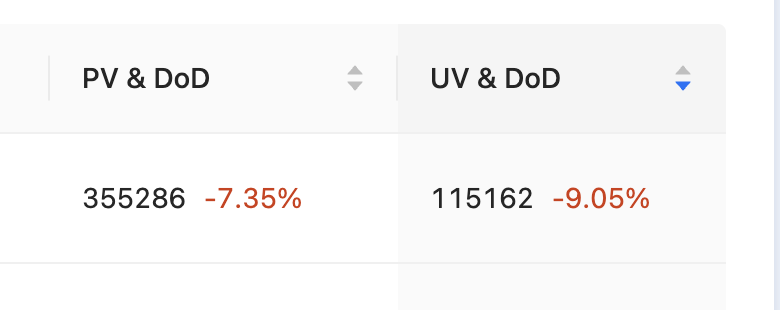
These terms of statistics are defined in the following table. For details, see View mini program analytics data.
Term of statistics | Definition | Description |
PV | Page View | Indicates the total number of page/screen loads generated by the mini program during the selected date. |
UV | Unique visitors | Indicates the number of distinct visitors who visited the mini program during the selected date. A user who visits a section multiple times is still considered to be a single unique visitor. |
DoD | Day over Day | Indicates the day-over-day change for UV. The change in UV compared with the prior calendar day. |
What's the definition of the Total Users in the Analytics tab?
The Total Users is the accumulated number of users till that date. There are several Total users used in the following different scenarios:
Scenario | Description |
Total Users for Daily Search | The number of users who performed the mini service search function per day. |
Total Users (Add to Favorites) | The number of users who added mini programs to Favorites. |
Total Users (Remove from Favorites) | The number of users who removed mini programs from Favorites. |
For more information, see Mini service analytics.
What's the difference between Total Users and Page Views?

Page views: Indicates the total number of page/screen loads generated by the mini program during the selected date, which is ONLY for that specific date and does not distinguish the "unique" page.
For example, a user opens a mini program, clicks one page 10 times then another page 20 times. In this case:
- Total Users +1
- Page views for that day + 30
If the same user exits the mini program, then goes back to the mini program. The Total Users counts now 2 because it is Total Users rather than Total Unique Users.