
/v1/payments/cancel
POST /v1/payments/cancel
The cancel API is used to cancel a payment when the payment result has not been returned for an extended period, or when the merchant, after reviewing the customer’s order, decides not to accept it. Upon successful invocation of the cancel API, the full amount paid by the customer will be returned.
To cancel a payment, you need to provide one of the following parameters:
paymentId: The original payment ID of the payment request to be canceled. It is generated by Alipay when a merchant initiates the original payment.paymentRequestId: The originalpaymentRequestIdof the payment request to be canceled.
Note:
1) After merchant initiated capture, void, refund for a payment, it is not allowed to initiate a cancel.
Note: All monetary values in the fields of request and response in their smallest currency units, and for IQD, the smallest unit is fils. Thus, if a transaction amount is 150 IQD, the value will be gaven as 150000.
Message structure
A message consists of a header and body. The following sections are focused on the body structure. For the header structure, see:
Request
Property | Data Type | Required | Description | Example |
paymentId | String | No | The unique ID that is assigned by the wallet to identify a payment. Max. length: 64 characters. | "2023120611121280010016600090000xxxx" |
paymentRequestId | String | No | The unique ID is assigned by a merchant to identify a payment request. Max. length: 64 characters. | "2023112719074101000700000077771xxxx" |
extendInfo | String | No | The extension information that wallets and merchants want to describe. The format shoud be JSON format. Max. length: 2048 characters. | "extendInfo: This is additional information" |
Response
Property | Data Type | Required | Description | Example |
result | Yes | The request result, which contains information such as result status and error codes. | { "resultCode": "SUCCESS", "resultStatus": "S", "resultMessage": "Success." } | |
paymentId | String | No | The unique ID is assigned by the wallet to identify a payment. Max. length: 64 characters. | "2023120611121280010016600090000xxxx" |
paymentRequestId | String | No | The unique ID is assigned by a merchant to identify a payment request. Max. length: 64 characters. | "2023112719074101000700000077771xxxx" |
cancelTime | Datetime | No | The actual time when the payment cancellation process is completed. This property is returned only when the cancellation succeeds. The value follows the ISO 8601 standard. | "2023-01-08T12:12:12+08:00" |
Result process logic
In the response, the result.resultStatus field indicates the result of processing a request. The following table describes each result status:
resultStatus | Decription |
S |
It means that the cancellation is successful. The corresponding
|
U | It means that the status of the cancellation result is unknown. The corresponding
|
F | It means that the cancellation fails. The corresponding
|
Error codes
Error codes are usually classified into the following categories:
- Common error codes are common across all mini program's APIs.
- API-specific error codes: are listed in the following table.
resultStatus | resultCode | resultMessage |
F | ORDER_STATUS_INVALID | The order is in invalid status such as CLOSED. |
F | ORDER_HAS_BEEN_CAPTURED | The cancellation does not support when the order has been captured. |
F | ORDER_HAS_BEEN_REFUNDED | The cancellation does not support when the order has been refunded |
F | ORDER_HAS_BEEN_VOIDED | The cancellation does not support when the order has been voided. |
F | CANCEL_NOT_ALLOWED | The cancellation not allowed in agreement. |
F | CANCEL_WINDOW_EXCEED | The cancellation date is beyond the period that is agreed in the contract. |
F | ORDER_NOT_EXIST | The order does not exist. |
F | KEY_NOT_FOUND | The key is not found. |
F | CLIENT_INVALID | The client is invalid. |
F | INVALID_SIGNATURE | The signature is invalid. |
F | METHOD_NOT_SUPPORTED | The server does not implement the requested HTTP method. |
F | MEDIA_TYPE_NOT_ACCEPTABLE | The server does not implement the media type that can be accepted by the client. |
F | PARTNER_STATUS_ABNORMAL | The partner status is abnormal. |
F | PARTNER_BALANCE_NOT_ENOUGH | The partner balance is not enough. |
Samples
For example, a wallet user wants to purchase something in Mini Program, the merchant can call this cancel API to cancel the payment transaction within T day under these circumstances and E-Wallet will not settle payment this transaction in T+N day either.
- when the user wants a full refund within T day.
- when the payment result does not return for a long time.
- ...
If the user wants a full refund or partial refund, the merchant backend should call refund API instead because the money has been settled to the merchant.
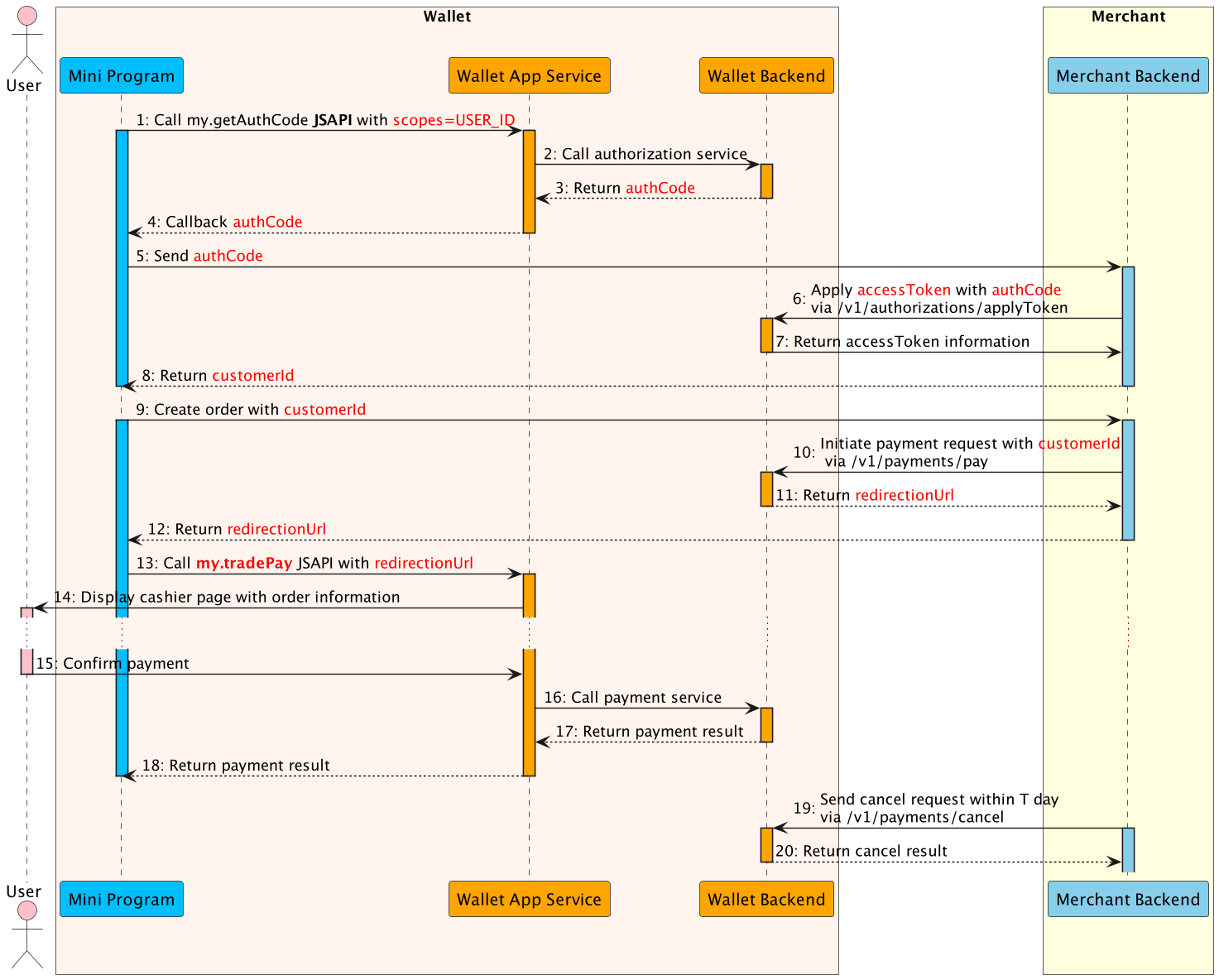
- The Mini Program calls this my.getAuthCode JSAPI with specific scopes(USER_ID) to request an authorization code.
- The E-wallet App service calls authorization service to processes the authorization information.
- The E-wallet backend verifies the authorization information, generates the authCode and returns.
- The E-wallet App service returns the authCode to the Mini Program.
- The Mini Program sends the authCode to the merchant backend.
- The merchant backend calls the applyToken API with authCode to apply the accessToken.
- The E-Wallet backend returns accessToken information to the merchant backend, such as customerId, accessToken, refreshToken, etc.
- The Mini Program creates an order with customerId.
- The merchant backend calls the payment API to initialte payment flow, including customerId as referenceBuyerId, paymentNotifyUrl(optional), etc.
- The E-Wallet backend returns payment detail information the merchant backend, such as redirectionUrl.
- The merchant backend passes the payment detail information to the Mini Program.
- The Mini Program calls the my.tradePay JSAPI with redirectionUrl to conduct the payment.
- The E-Wallet App Service displays the cashier page with order information, such as amount, order details, etc.
- The user confirms the payment in the cashier page.
- The E-Wallet App Service calls payment service and execute the payment process.
- When the payment reaches the final status, the E-wallet backend returns the payment result to the Mini Program (Step 18).
- The merchant backend calls the cancel API to refund the money within T day(Step 19).
- The E-Wallet backend returns the cancel result to the merchant backend.
Request
{
 "paymentId":"2023120611121280010016600090000xxxx",
 "paymentRequestId":"202331231313123123"
}- paymentId is the unique Id of a payment generated by Wallet.
- paymentRequestId is the unique Id of a payment generated by Wallet merchants.
Note:
This interface support cancels with paymentId or paymentRequestId. paymentId and paymentRequestId can not both empty, paymentId has a higher priority than paymentRequestId, which means that if you offer both paymentId and paymentRequestId, we will use paymentId and ignore paymentRequestId.
Response
{
 "result": {
    "resultCode":"SUCCESS",
    "resultStatus":"S",
    "resultMessage":"Success."
 },
 "paymentId":"2023120611121280010016600090000xxxx",
 "paymentRequestId":"202331231313123123",
 "cancelTime":"2023-06-08T12:12:12+08:00"
}
- result.resultStatus==S shows that the Wallet cancel is successful.
- cancelTime describes the success date time of this cancel.