Release status reference
Your mini program's release status changes as it moves through different phases. Understanding the statuses helps you track progress, respond to required actions, and know what comes next in the release workflow.
Status list
The following table lists all release statuses in their typical order, along with their respective description, supported environments, and available user actions:
Status | Description | Supported environments | Available user actions |
New Version Created | Initial status. The release is created. Reached after you select a target app and environment. | All |
|
Under Review | Your release is awaiting approval from the super app. Reached after you apply to release for a target that requires manual approval. |
|
|
Release Preparation | Your release is ready to go live. Reached after approval if pilot testing is not supported in the target app. | Production |
|
Pilot Testing | The release is ready for or is undergoing final internal testing. Reached after approval if pilot testing is supported in the target app. |
|
|
Grayscale Release | The version is ready to go live or is being rolled out to a subset of the target users. Reached after pilot testing or release preparation is complete. | Production |
|
Full Release | The version is live to 100% of the target audience. | All | N/A Note: A new release will archive this one. |
Canceled | A final status. Release was canceled during one of the following phases:
|
| N/A |
Archived | A final status. The version is no longer active. This happens if:
| All | N/A |
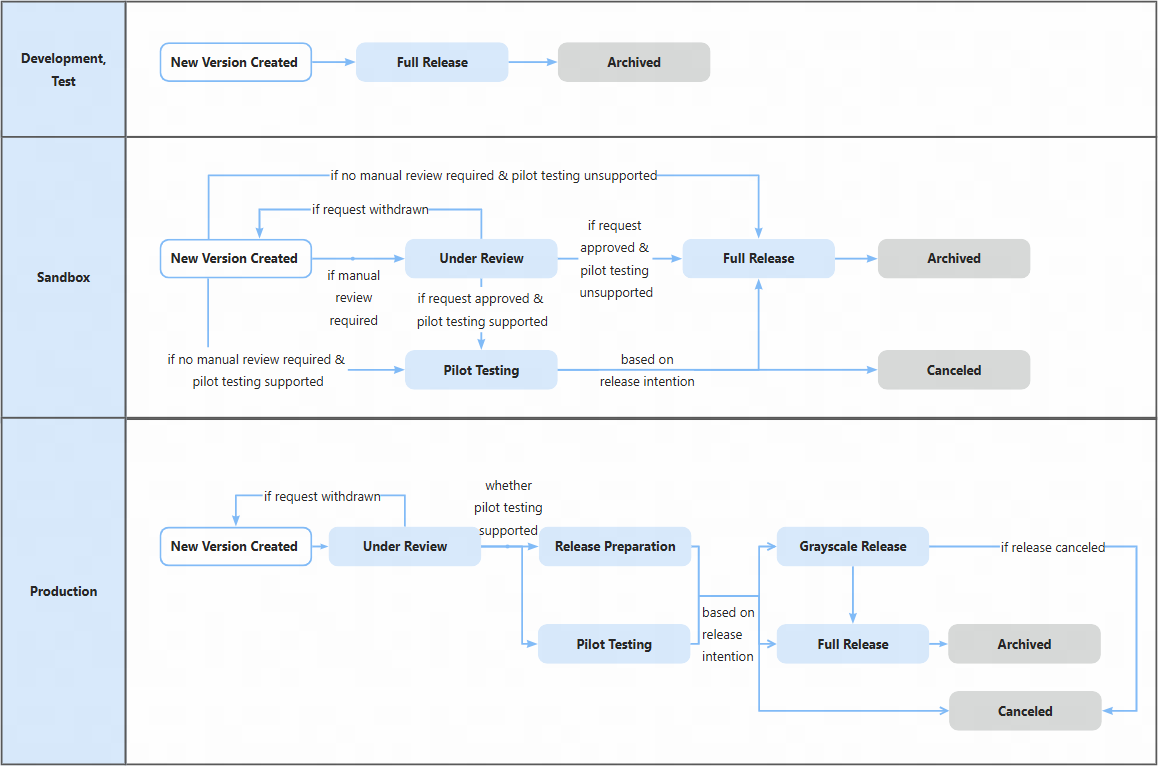
Status flow
The following diagram illustrates how the status changes from start to finish in each environment: