

Integrate SDK via SPM
This topic introduces how to integrate the IAPMiniProgram SDK via Swift Package Manager (SPM).
Prerequisites
Item | Requirement |
Xcode | 15.0+ |
iOS deployment target | 12.0+ |
SDK version | XCFramework version ≥ 2.83.0.99 See SDK release notes.
|
Integration procedures
Step 1. Download SDK resources
- Open the MiniProgram platform, sign in with your account
- Go to the SDK download page, select the SDK version that matches your project, and download it. See the following figure as an example.
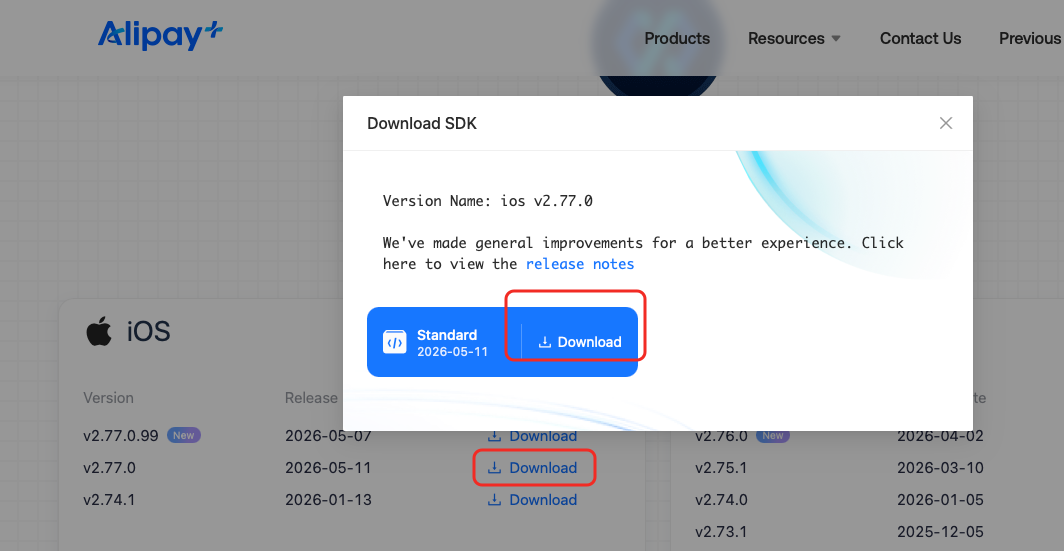
- After unzipping the SDK package, the directory structure is as follows:
Almost each folder corresponds to one SDK component (e.g. Operation, Google Map) . For more information, see the Integrate SDK components topic.
IAPMiniProgram/
├── IAPMiniProgram/                    # core module(required)
│   ├── framework/                     # xcframework binary
│   └── resource/                      # bundle resources
├── IAPMiniProgram_Operation/          # operation module(optional)
├── IAPMiniProgram_AppleMap/           # Apple Map(optional)
├── IAPMiniProgram_GoogleMap/          # Google Map(optional)
├── IAPMiniProgram_Video/              # Video(optional)
├── IAPMiniProgram_Media/              # Media/audio(optional)
├── IAPMiniProgram_Lottie/             # Lottie animation(optional)
├── IAPMiniProgram_Bluetooth/          # Bluetooth(optional)
├── IAPMiniProgram_BioAuth/            # biometric authentication(optional)
├── IAPMiniProgram_Legacy/             # legacy feature compatibility(optional)
├── IAPMiniProgram_ACTranslation/      # translation(optional)
├── IAPMiniProgram_ACManifest/         # Manifest(optional)
├── IAPMiniProgram_Inspection/         # inspection(optional)
├── IAPMiniProgram_Localization/       # multil-lang localization(optional)
├── IAPMiniProgram_Optimizations/      # Optimization(optional)
├── ThirdParty/                        # third-party dependencies
└── IAPMiniProgram-SPM/                # SPM package(core)
    ├── Package.swift                  # SPM package defintion
    ├── Scripts/
    │   └── sync_from_local.sh         # xcframework output synchronization shell script
    └── Sources/                       # wrapper target source code + Resources/(bundle, with the package)
Step 2. Synchronize SDK output to SPM package
Synchronize the xcframeworks of each module to the IAPMiniProgram-SPM/xcframeworks/ directory:
cd IAPMiniProgram-SPM
bash Scripts/sync_from_local.sh --execute
Step 3. Add the local SPM package to the Xcode project
- Open your app's Xcode project.
- Clike File → Add Package Dependencies...
- On the bottom-left corner, click Add Local...
- Choose
IAPMiniProgram-SPM,click Add Package to add the local SPM package to the Xcode project.
Step 4. Select modules to integrate
In Xcode, select the modules that you need to integrate in the SPM package product selection dialog. See the following SPM integration module overview section. Different module combination realizes various integration scenarios.
Integration scenarios
The following table list some common SPM integration scenarios:
Scenario | Modules to select |
Minimal integration (integrate only the core/required module) |
|
Core integration, video, and media integration |
|
Full integration | Select all modules |
Step 5. Build & Run
Connect the device, compile and run.
Step 6. (Conditional) Upgrade SDK version
If you need to upgrade the SDK version, see the Upgrade SDK version topic.
SPM integration module overview
The modules to integrate includes the a core/required module, and a set of optional sub-modules:
- Core/required module: is
IAPMiniProgramCore, which must be integrated always. This realizes the minimal integration, which equals topod 'IAPMiniProgram'. - Sub-modules: are all optional. They can be integrated on demand, e.g.
IAPMiniProgram_Video. Almost each sub-module corresponds to one SDK component (e.g. Operation, Google Map) . For more information, see the Integrate SDK components topic.
Core/required module
Module name | Capability | Core xcframework | Core bundle |
| Core/required module. Must be integrated always. |
|
|
Sub-modules
Sub-module name | Capability | Extra xcframework | Extra bundle |
| Operation module (e.g. data monitoring, user interaction, rating, handling feedback and comments) |
|
|
| Apple map |
|
|
| Google map |
|
|
| Play videos |
|
|
| Play audios |
|
|
| Lottie animation |
| NA |
| Bluetooth |
| NA |
| Biometric authentication |
| NA |
| Implement Alipay Connect features |
|
|
| Implement translation capabilities |
|
|
| Mini Program manifest / resource management |
|
|
| Implement inspection capabilities |
|
|
| Multil-language localization | NA |
|