

Overview
To make your mini program accessible to users from different cultures and regions, you can localize your mini program information in multiple languages. This helps users read the information in their preferred language.
Core language concepts
Familiarize yourself with the following concepts used throughout the platform and documentation:
- Language: In this document and in some UI text, language refers to a specific language variant, also known as a locale. For example, English (US).
- Base language: The fundamental language that forms the basis for regional variants. For example, English is the base language for both English (US) and English (Singapore).
- Supported languages: The languages available on the platform that you can choose to localize your mini program information.
- Default language: The fallback language to display the information in when a user's preferred language cannot be accessed or does not match any language you provide. It follows these rules:
- The first language you add is automatically set as the default.
- It will appear as the first tab in the language tabs.
- If you provide two or more languages, you can change which one is the default.
Language display logic
When a user views your mini program information, the system selects the display language based on the following factors:
- The language versions you provide for your mini program information.
- The user's preferred language. For more information, see:
- The default language you select.
- The order in which language versions are added.
The system selects the display language according to the following priority:
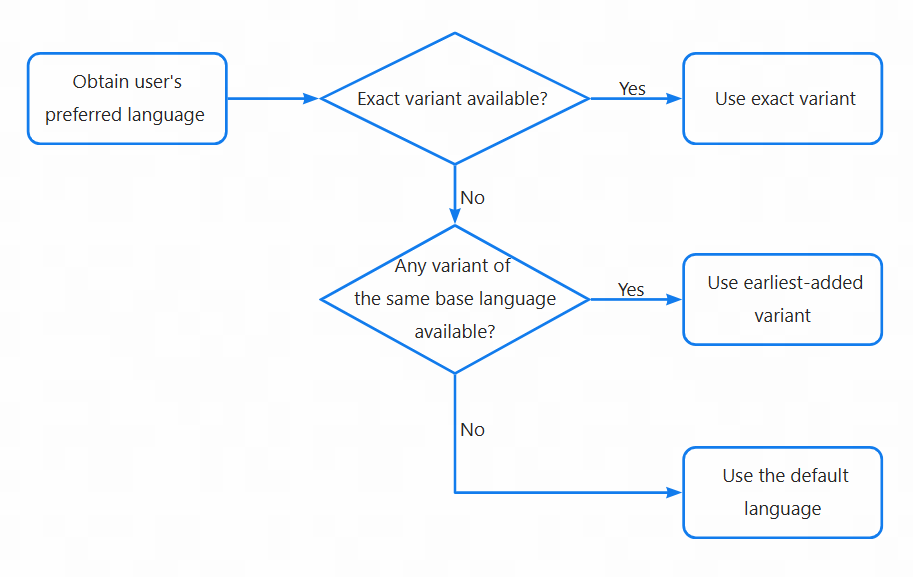
- Exact language variant match
- Condition: Available language version exactly matches a user's preferred variant.
- Result: Display the matching version.
- Example: A user prefers English (US), and you provide English (US), then the system displays English (US).
- Same base language, different variant match
- Condition: No exact match, but variants of the same base language exist.
- Result: Display the earliest-added variant.
- Example: A user prefers English (US), and you provide English (Singapore) (added early) and English (Indonesia) (added later), then the system displays English (Singapore).
- Default language fallback
- Condition: Neither an exact match, nor another variant of the same base language exists.
- Result: Display your selected default language.
- Example: A user prefers English (Singapore), and you provide Chinese (China Mainland) (set as the default language) and Thai (Thailand), then the system displays Chinese (China Mainland).
Manage languages
You can manage the languages for your mini program's information to better support users through the following actions:
- Add a new language version for the information: Provide your mini program's information (for example, name and description) in an additional language to support more users.
- Change the default language: Change the default language to display the information in.
- Delete a language version for the information: Delete a language version that you no longer need for your mini program's information.