

Create funnels
Funnels are the basis for funnel analysis on the Mini Program platform. By defining a sequence of events as steps, you can measure conversion rates and identify drop-off points in key user journeys.
This topic describes how to create funnels on the Mini Program platform.
Procedure
To create a funnel, take the following steps:
- Log on to the Mini Program platform.
- In the left navigation panel, choose Analytics > Custom Analysis.
- On the displayed Custom Analysis page, find the desired mini program.
- Click Funnels in the Action column. The Manage Funnel tab is displayed.
- On the Manage Funnel tab, click New Funnel.
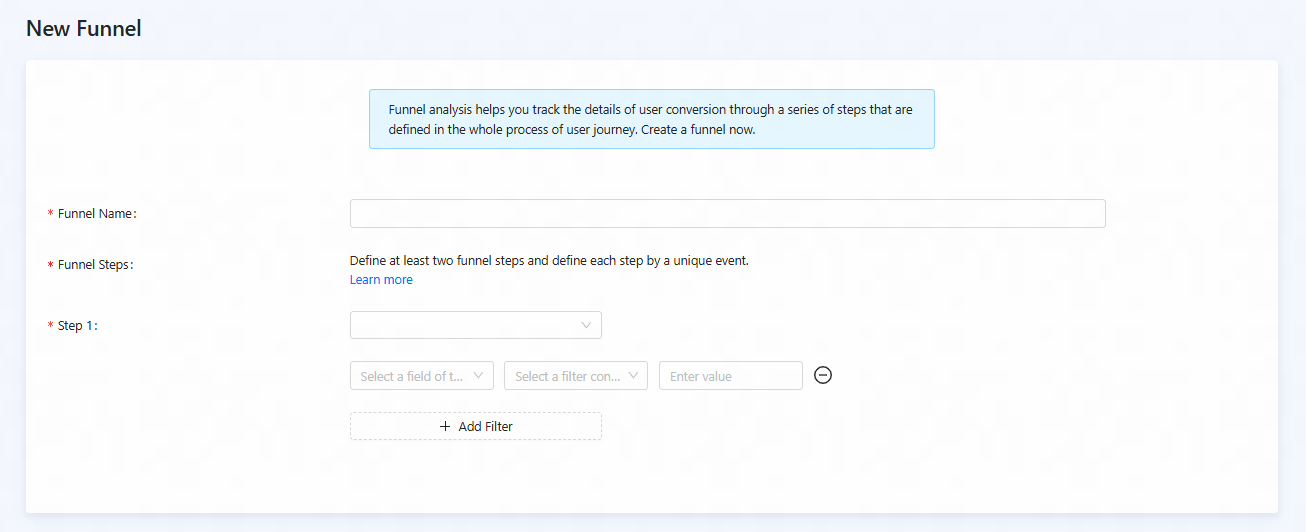
Figure 1. Create a funnel
- On the New Funnel page, configure the parameters:
Parameter | Description |
Funnel Name | The name of the funnel. Follow a clear and consistent naming convention so analysts can easily recognize its purpose. |
Funnel Steps | Define the sequence of user actions that constitute the funnel. Define at least two funnel steps and define each step by a unique event.
Click Step to add subsequent steps to your funnel definition. |
- After the funnel is configured, click Save. This stores your funnel configuration, and it will be immediately available for analysis.