

Overall workflow
Alipay+ Mini Program Platform provides end-to-end mini program management capabilities, creating a collaborative ecosystem that connects merchants with independent software vendors (ISVs) to turn business requirements into technical solutions.
Merchants can develop and manage mini programs independently. They can also assign ISVs to develop and manage mini programs on their behalf.
This topic describes the overall workflow of developing customized mini programs for merchants by ISVs.
Introduction
This section compares self-developed mini programs by merchants and third-party mini programs by ISVs.
Self-developed mini programs
Merchants develop and manage in-house mini programs tailored to their business needs. The mini program belongs to the merchant or their company.
The following chart shows the relations of self-developed mini programs.
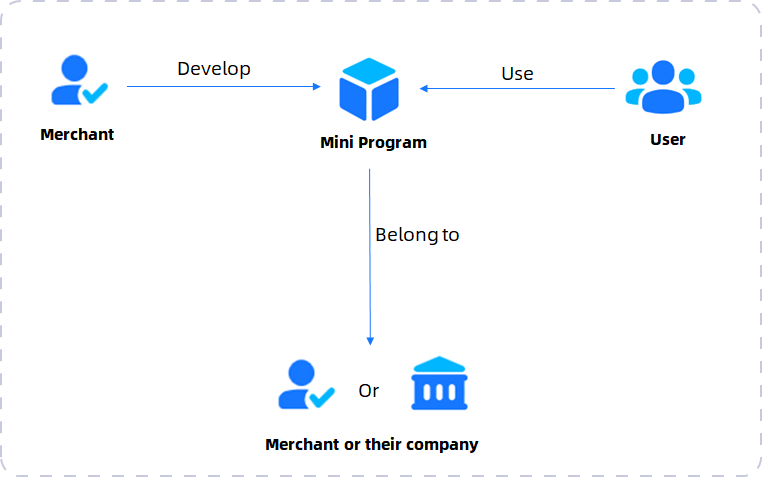
Figure 1. Self-developed mini programs
Third-party mini programs
ISVs act as third-party developers to build and manage mini programs on behalf of merchants. The mini programs belong to the merchants.
The following image shows the relations of third-party mini programs.
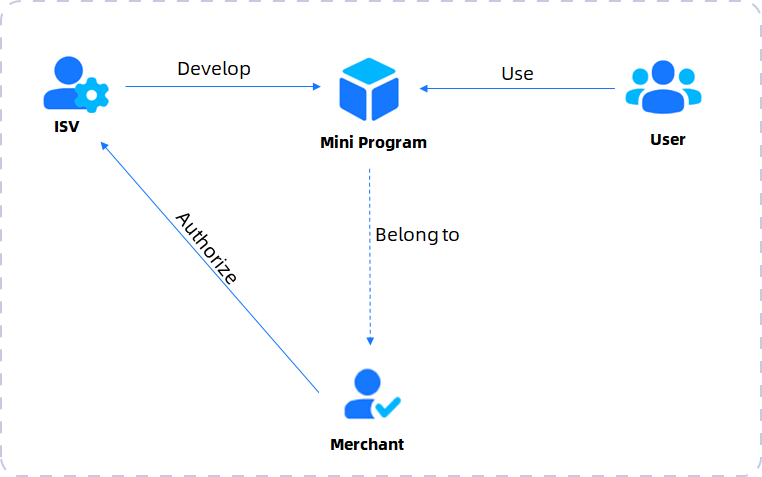
Figure 2. Third-party mini programs
Capabilities and benefits
ISV-led development bridges the gap between merchants with unique business requirements and ISVs with technical expertise.
When a merchant authorizes an ISV, the ISV can manage, develop, and deploy the mini program on the merchant's behalf. This approach allows for tailored digital experiences that align with specific business logic, branding, and workflows.
Once authorized by a merchant, an ISV can:
- Add developers: Invite ISV developers to the merchant's mini program member list.
- Develop & upload: Write code, configure settings, and upload versions using the IDE.
- Submit for release: Handle the submission process for approval and release the mini program.
- Manage services and orders: Handle the services and orders, facilitating the overall process.
Customized mini program development brings various benefits:
- Tailor-made solutions: Go beyond generic templates. ISVs can build complex features, integrate custom APIs, and design bespoke interfaces that cater to merchants' specifc market needs.
- Professional management: Merchants can focus on their core business while ISVs handle the technical development, including coding, security configurations, version updates, and the release processes.
In short, customized mini program development empowers merchants to scale their digital presence with professional support, ensuring their mini programs are not just functional, but a powerful extension of their brand.
Workflow
The following section details the end-to-end process of ISV-led mini program development.
The following high-level flowchart illustrates the interaction between the ISV, the merchant, and the platform.
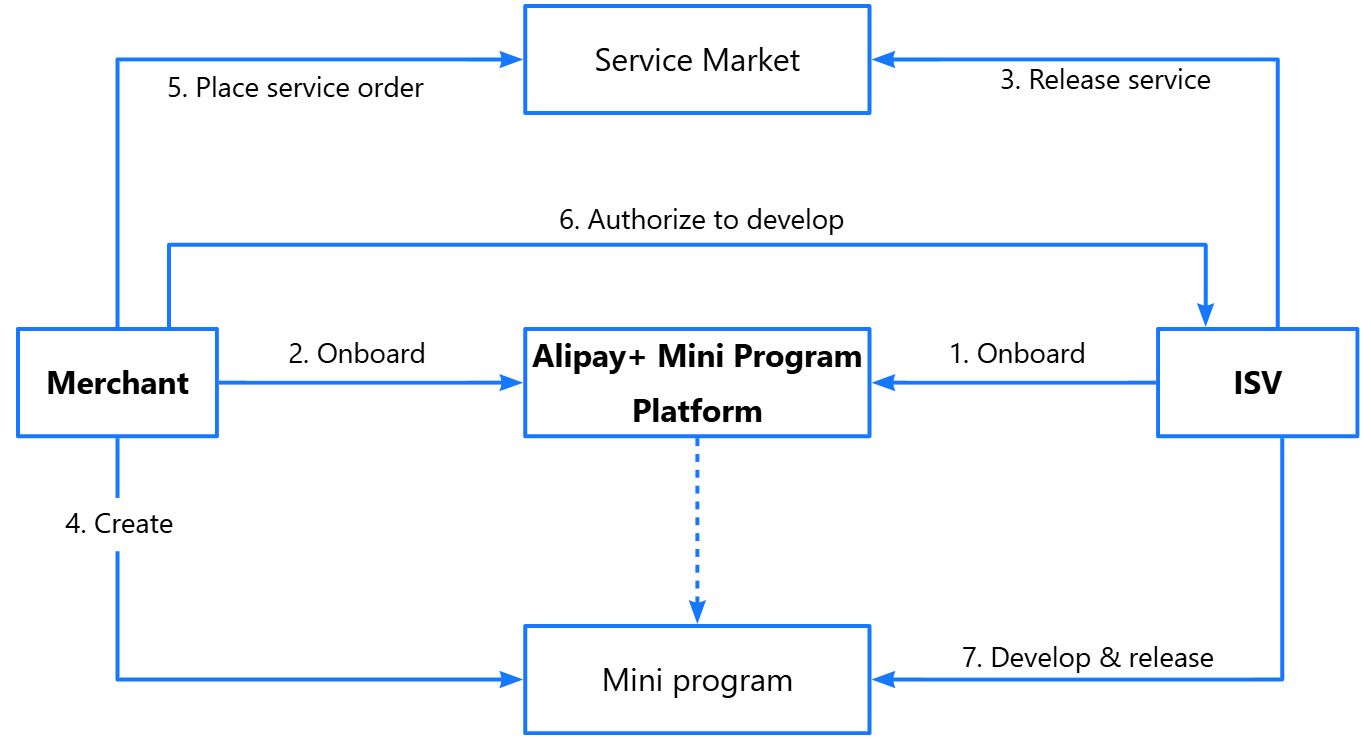
(ISV & Merchant) Onboard to the platform
Before any development can begin, both parties must establish their presence on the Alipay+ Mini Program Platform.
- For ISVs: Register company accounts, complete identity verification, and log in to get started.
- For merchants: Complete the registration and onboarding process to become a valid entity capable of owning a mini program.
(ISV) Create a service
Once onboarded, the ISV must create a service to define its offering information, such as the industry, payment information, and company information.
- Create service: After onboarding and logging in to Alipay+ Mini Program Platform, navigate to Service Management.
- Fill in key information: Fill in service details such as name, industry, type, description, images, and applicable apps, as well as payment information and company information.
- Submit for approval: After all required information is entered, submit the service release request for platform review.
- Go online: Once the request is approved, the service status changes to online, making it visible to merchants in Service Market.
(Merchant) Create a mini program
The merchant creates a mini program:
- Access the platform: Log in to the platform and navigate to Manage Mini Programs page. Click Create Mini Program to open the setup form.
- Configure details: Fill in the required mini program information by following the on-screen instructions.
- Finalization: Once created, the new mini program will be listed on the platform.
(ISV & Merchant) Place an order
This step connects the merchant's need with the ISV's solution.
- (Merchant) View services and place an order: Navigates to Service Market to view all services and select the service to place an order.
- (ISV) View and accept the order: View the order information. The process proceeds after the ISV accepts the order.
- (Merchant) Confirm the order: Confirm the order to initiate the development stage.
(ISV) Develop the mini program
With authorization granted, the development work begins.
- Team setup: Add developers to the merchant's mini program member list.
- Coding: Use the IDE to write code, integrate APIs, and configure business logic.
- Upload: Upload the compiled mini program package to the platform.
- Configuration: Set up domain names, business parameters, and UI assets as required.
- Submission and release: Submit the mini program for platform review and release.
(ISV & Merchant) Close the order
After development, the ISV submits a request to the merchant to close the order. The final stage ensures successful delivery and formal closure.
- (ISV) Submit closure request: Submit a request to close the order.
- (Merchant) Approve the request: Review and approve the request.
- Finalization: The order closes after the merchant approves the request.
- (Merchant) Post-launch management: Observe mini program statistics and perform maintenance as required.